Showing posts with label Succeed. Show all posts

Tuesday, November 08, 2011

Device upgrade - how #Apple was a #Fail and #Microsoft was a #Success


So yesterday was a bad day with apple.  You can read more – see the links below.  But I think the title of the post says most of it.

Apple upgrade woes
3 hours on tech support phone call
7 hours+ to do upgrade
Upgrade incomplete
Data lost
Result: Misery

Microsoft Upgrade works a treat
0 hours on tech support
3 hours to upgrade
Upgrade complete
No data lost
Result: Happiness

Oh, PS I upgrade both of the family Satnav’s last night, Garmin’s upgrade tools worked a treat.

Wednesday, October 19, 2011

#Success Yesterday I got angry with #VMware, at #VMworld but #congratulations are now deserved

Yesterday I blogged http://corylus.blogspot.com/2011/10/fail-vmware-congratulations-you-are.html

Later that day, VMware proved they can be nimble and take out of scope decisions quickly, i have tired over recent years of large corporates telling me I have a good idea, but their policy/budget/manger/exec does not allow and that they are sorry that they cannot execute the good idea, so...

After the potential PR disaster of mistakenly telling a few hundred people at VMworld Europe they had won an iPod, VMware's initial response was simply sorry. Later that was upgraded to a free marketing t-shirt. Ho hum. I was not impressed.

So I wrote to them suggesting that for a few hundred quid (probably not even detectable in the budget for the conference!) they could have one extra iPod and hold a random draw for all those who thought they had already won one. It would not fix things, but it would at least give everyone a chance, and demonstrate that VMware understood the impact they'd had.

It's NOT about "compensating", it's about recognising the excitement and then disappointment that people will have experienced.

To my amazement, VMware not only agreed, but said they'd give me an iPod to say thanks for the idea. I don't often get the chance to praise big companies, but I am happy to do so here.

But, I stress, even if they'd not got a second for me, I'd still have written this post

Begin forwarded message:

Subject: RE: Suggestion, was: Re: Congratulations, You are a VMworld Survey Prize Winner

Peter

Thank you for the suggestion.

Since you came up with this suggestion, we will provide you with one.

Please come by meeting room xx in the Bella Center to receive your iPod.

Thanks

Name removed

Subject: Suggestion, was: Re: Congratulations, You are a VMworld Survey Prize Winner

How about you put an iPod Touch into a draw for all the people who got the email?

Cost you a few hundred quid/dollars/euros and everyone who thought they had one, would at least have had a bite at one.

Not trying to be troublesome, just making a suggestion to overcome the loss of goodwill and the major disappointment felt all round. It wasn't *inconvenient* it was exciting, and then massively disappointing.

Wednesday, September 28, 2011

Want #Mango #WP7 now? But your network connection is not immediately adjacent to your desk, or awkward to break. #PowerShell


Mango is now available, and there is a cheat that seems to bypass the “wait until Microsoft/Your Carrier” make it available to you.  Read more here: http://www.wpcentral.com/force-mango-update-early-through-zune-software
However the trick relies on disconnecting your internet connection within a few seconds.  This is fine and dandy if the cable is right by your keyboard, mouse and monitor, but not if it isn’t.
Obviously you can enable/disable the NIC, but Windows 7 (at least here) takes a variable amount of time to perform the disconnect.  Factor in UAC asking you for permission to disconnect then you have a bigger timing problem.
So a quick jump to the internet.  The following lines of code sort it out.
Firstly, start a PowerShell session (ISE or prompt), but with Run as Administrator rights to avoid issues.
Then use the line:
Get-WmiObject -Class Win32_NetworkAdapter | Format-Table Name, NetEnabled, NetConnectionStatus, DeviceId –auto
This lists all your network connections, (extract below)
Name                                       NetEnabled NetConnectionStatus DeviceId
----                                       ---------- ------------------- --------
<snipped>
WAN Miniport (Network Monitor)                                            6      
Intel(R) PRO/1000 MT Server Connection     True       2                   7      
<snipped>
Identify the Device ID for your network connection.  In this case 7.
The following lines of code needs to run once only in your ISE session
$Nic = Get-WmiObject win32_networkadapter -computerName LocalHost -filter "DeviceId = 7"
Note that the number 7 at the end will need to be changed for your environment.
Then finally –
$Nic.enable()
or
$Nic.disable()
As you wish to switch your NIC on and off. 
So, having prepped all that, a quick click on linking on the Zune screen below
Followed by a click on UPDATE, and then immediately run the disable command, and Robert’s your mother’s brother.  When you click on the presented choice to download an update – don’t forget to enable your link again.
Note you may need to update teh Zune software, so you'll get a bit of this:
 
For a bit.


But then you should see an update offered, something like this.

7403 offered to user
7403 ready to download


Repeat until you have Mango installed

Enjoy!

Friday, September 02, 2011

#LFMF #PowerCLI Get-Folder contents #PowerShell


Because a “copy folder from the Datastore browser” backup of VM files is so inefficient, I’m writing a PowerShell process to improve my backups of the virtualised world.  Because I can move VM’s around onto different storage locations a hard coded “goto this datastore, download these VM’s” is going to need rewriting every time I do this.*

So I resolved to use as a starting point the Get-Folder command (and spawn a generic process for each Folder) that I have.

So I started to look at a folder (from the VMs and Templates view, not Hosts and Clusters) to do some testing on.  As the only, completely non active folder is Templates, I thought I’d start with that.

So the line of code I was looking at was something like:

Get-VM -Location (Get-Folder Templates) | Sort Name)

However I was getting nothing back, the code would run (there’s a lot more, but I won’t bore you with it until it’s all working), and there was a null result.  I didn’t quite spend days and days looking at it (see King Crimson - Indiscipline, Lyrics here), but I did spend quite a while thinking I’d got something wrong.

Then I had a thought – isn’t there a Get-Template command too?

Coded like this:
Get-Template -Location (Get-Folder Templates) | Sort Name)

I get some results.  Stupid of me to test a folder with wholly atypical contents

More later!

*I know some will wonder why I take flat file backups of VM’s.  It’s because I’m paranoid OK?  I copy them to external USB/FireWire drives for complete recoverability.  It’s not like I do it every day or anything

Tuesday, July 12, 2011

When near Holborn (Leather Lane to be precise)

One must not forget the Department of coffee and social affairs

12-14 Leather Lane

You can see why....
http://www.departmentofcoffee.co.uk/

Tuesday, May 31, 2011

Scheduled tasks not running in Windows 2003 Server Domain Controller


I’ve a couple of virtualised DC’s in the farm that (to make AD restore much easier) do a daily backup to a second partition which then gets farmed out for protection.
The purpose is that when you start a VM in DRSM mode access to backups is, ahem, somewhat tricky.  So by having a partition within the machine with the latest backup (or a restored copy of an earlier one…) can mean a simple NTBACKUP restore can be swiftly executed to give peace in our time.
Well… for some time one of the machines had tasks in scheduled tasks that “Could not start”, and as an added function when you inspected the task properties you’d be prevented by error 0x8009016.
Now there are oodles of ideas out there, and over the past few months (yes, months) when I found time I would give it a go.
Finally today, it seems to be fixed.
Solution Pointer:
Method:
Taking the hint about stopping services, I went for broke and ran this PowerShell command
# stop all running services
Get-Service * | where {$_.status -eq "Running"} | Stop-Service –Force
Thus the server was reduced to absolute minimum of operating features.
Then taking step 6 on its own
“Delete all of the files in the ‘C:\Documents and Settings\All Users\Application Data\Microsoft\Crypto\RSA\S-1-5-18’ folder”
But I did (and do recommend) take the more precautious approach of renaming the single file contained therein.
Then a start of all the automatic services by
# start Automatic services that are not Running:
Get-WmiObject Win32_Service | Where-Object { $_.StartMode -eq 'Auto' -and $_.State -ne 'Running' } | start-service
And tried to inspect a task’s properties, and it failed.
On further inspection I found the RSA folder was still empty, so decided a reboot would be worth it.
After the reboot, the RSA folder was populated, the task properties were available again, but the task would not run.  A quick delete and re-create of the task and Robert was my mother’s brother again.
Phew!

Monday, May 02, 2011

ESXi 4.1 Update 1 travail - lessons learned.

I’ve been biding my time over the last few months to migrate to ESXi.  Knowing that ESX4.1 is that last edition of the “full fat” VMware, I knew my next move would have to be to ESXi, so rather than make a bigger job whenever (cough) 5.0 is launched. I thought I’d change over the long weekend when I knew clients would be closed.
 
It was entertaining.
 
Building a boot and install USB stick rather than using a DVD burned with an ISO image was an important part of the test.
This is going to come in useful next month as I have some client work then, where the dirty nature of the computer room (a breeze block room in the corner of the warehouse) means that DVD drives become unusable within a few months – I dread to think (and am not responsible for!) the state of the servers and SAN…  So anyway I want to be able to boot and install from USB if necessary.
http://blog.vmpros.nl/2010/09/03/vmware-how-to-create-a-bootable-esxi-usb-stick/ didn’t really work for me, but http://www.ivobeerens.nl/?p=699 proved to be a good source of a procedure on how to do this.  However there are some caveats to the process:
  • Syslinux 4.0.4 (the latest) does not work (or at least did not for me) – stick to 4.0.3!!
  • When modifying the contents of the stick remember to do everything!
  • Whilst the storage in my instance is software iSCSI IT IS IMMENSELY PRUDENT TO DISCONNECT STORAGE.  As this install process initialises some storage, you do not want to accidentally wipe a LUN.  My recommendation is always to build ESX(i) hosts disconnected from storage.  It prevents an easily avoidable mistake.  Likewise I avoid “Boot from SAN” setup.
  • Make sure you follow all the steps. I managed to miss 1 or 2 a few times before I got it right.
  • Don’t forget that the KS.CFG is YOUR INSTALL SCRIPT.  It’s easy to forget this and take the content and run with it.  If you do, you’ll get an ESX box with 192.168.1.10 as its IP, VMware01 as the root password, and ESXi-01.beerens.local as its full name connected to a domain “beerens.local”.  I could be wrong, but I think this is unlikely to work in your world J
 
So once the stick is done:
  • Check for any Anti-Affinity rules in DRS, this will make sure your VM’s can have maximum mobility around the farm during the change.  You may want to weaken them
  • Move any non-running servers off local storage (if there is any) to SAN or other shared storage – cut and paste or storage migrate.  If you storage migrate you can change the host as well to unregister them from the server.
  • Storage migrate all running VM’s on local storage off the server to shared storage (no downtime here).
  • Put the ESX host in maintenance mode (and take the option to migrate all paused and stopped machines off the host).  All running guests will migrate off
This will leave you with a host doing no work, and having no VM’s stored in its local storage.
 
Now, and this is optional, but I highly recommend it.
  • Document the server setup – including network settings, iSCSI paths, vSwitch names and configs.  In fact everything you can!!!  If you are licenced for it, then consider Host Profiles as a means to the end.
  • Disconnect all external storage connections, and verify this by checking via vCentre.
 
 
Now you can start, insert the USB, boot the server, select boot from USB if required and watch it install.  If you have boot from USB as default, then at the end of the install you should remove the USB before it boots again.
Your KS.CFG will do the initial configuration and you have a new ESXi server.
 
This is where some of my fun started.  Now please bear with me – some of this was done late at night over a bank holiday, so I did not do my more normal thorough investigation, and I do not have answers to all the questions, but a list of issues encountered and some observations.
 
  1. vCentre
I thought my vCentre was up to date.  I was lazy, it was not.  I discovered on adding the new host to my network that there were some management issues from VC to ESX.  So I needed to upgrade vCentre.  I also discovered that some VM’s would not start when running on the new host – it seems they were mostly VM Version 4; but also (to make things harder) VMtools needs to be updated too!
 
  1. vCentre upgrade ISO
This is a 2.2GB download.  You do not want to do this on a 512KB ADSL connection.  I hoiked out my 3G MiFi unit, and downloaded it over the air instead to the laptop.  I achieved a 10 fold performance benefit by using this.  Fortunately I had 3.5GB left on the monthly allowance, so all was well.
 
  1. vCentre Upgrade action
Sadly this is a lengthy process, but by using full documentation from the installation (you do have this don’t you?) I was able to breeze through the dialog boxes and get everything up to date except Update Manager.  For some reason that part of the ISO is corrupt.  I am downloading it again as I type.
For prudence I snapshotted the VM that is the VC before starting.  At times later on, I would be tempted to restore to this, put ESX4.1 back on the host and give up.
Oh, and don’t forget to take the in place upgrade option – if you go for a new database your whole farm is screwed! (no, I didn’t)
 
  1. vCentre Client upgrade
On starting the vCentre Client, the new VC edition wants an upgrade before I can connect to it.  This install fails…
Now this was fun… My main management server (physical still – for good historical reasons), is where I do most of the work.   However this is now 6 years old and has a large number of VMware components go through it.  Unfortunately… some old MST file was hanging around and the VI Client upgrade failed.  By now it was late at night after a quick burst of investigation I decided on a more radical approach.  I stopped all VMware services, hacked out all the VMware stuff from the registry, killed VMware folders in Program Files, and rebooted the machine.  This did not completely fix the install, and found a few more VMware folders in the Documents and Settings tree, they went too.
 
  1. DNS and AD failure
Yes, you read that right.  When this box came back DNS was down, and AD was not working as a consequence.  Fearing I’d ripped something out I hadn’t meant to I was tempted to hit the backup tape (you do take backups don’t you?) but waited a bit…
This being more a test lab than a production network the primary physical box on which I was working is the original DC of the network.   The other DC’s are virtual, and it turned out that neither had started properly when I had restarted the ESX hosts a bit earlier.  We had had a power cut earlier in the day, and whilst the kit had all stayed up, it seemed (only with hindsight) that whilst I have UPS’s all round a slight barf on one UPS had impacted a network switch and the virtual world was not talking to the physical world properly.  Taking the IT Crowd “Turn it off and on again” philosophy to its logical limit… I shut down all the VM guests (you do have a PowerShell script for this don’t you?!) and shutdown the hosts.  I then power cycled the switches and waited for them to come back.  I then booted the ESX boxes, and the physical server and all was well.  A quick check round logs and events proved this was the case.
I’m not going to try to work out why, as this was now 1am…
 
  1. vCentre client now installed properly and I can connect to vCentre Server again.
A quick bit of configuration of vSwitches, and all seemed to be well except…
 
  1. iSCSI connections
One of the iSCSI connections relies on decent security from the SAN side – and with the new ESXi installation the IQN’s on the software iSCSI had changed, so the SAN had to be told it was allowed to connect!  A quick fix there, and the new ESXi box can see all storage, and works a treat.
 
  1. Finally all was well
 
  1. So I just need that good ISO for the Update Manager installation so that I can now manage updates across the VM’s (VM Version and VMTools for now).
 
 
Observations?
  • Well you can see from the above that Douglas Adams was right when he wrote “Don’t Panic” – I could have given up with the backups, snapshots and original ESX4.1 that I had and gone back to square one.
  • Document your setup, NOW.  You never know when it might come in useful
  • In ESXi the Service Console no longer exists – look for the Management Network in your ESXi networking setup
  • IQN’s can change
  • Check your VM version – some of your older VM’s may be 4 instead of 7.  In my experience, a VM version 4 had some issues starting and seeing network hardware on a new host.
  • Anti-affinity – keep an eye on it, and restore it when done
  • If you use ESXTOP on ESX, don’t forget – without the service console, you won’t get this on the host
  • ILO – if you have it, make sure you know the password – it saves a lot of hassle connecting to the host
  • Lastly NEVER FORGET you can use the VI Client directly to the host to work things.  If the VC goes down, it means you can still start stop guests, enter/exit maintenance mode, reboot and shutdown an ESX box.  This can be your friend.  A lot.
 
 
Oh, and very lastly – if you finish work at nearly 3am in the morning after some problems like this, then the early morning Radio4 news on the day Osama Bin Laden is killed makes for a pretty good wakeup call.
 

Hurrah - a hibernating Hyper-V laptop!


Well, almost J

I got a new laptop last year and having bumped up the RAM and disk, I wanted to use for a virtualised lab on board whilst travelling or at clients.  Having experimented and asked around on Twitter there was no way (my preferred method) of having Windows 7 with ESXi running under VMware Workstation and then have 64bit guests in vCentre – the VT is not exposed to the ESX guests.  This would have given me the best of ESXi (and a VMware lab), and the VM’s I wanted for carrying a lab in the bag.  VMware workstation was not much use to me as without any memory management I would run out of headroom (although the tree cloned drives would be nice).

A non-trivial additional factor was that I insist on encrypted disks in my laptops.

I then experimented with getting a dual boot world going.  BitLocker and Boot from VHD work well, but not together.  I got a Bitlockered guest machine under Hyper-V as a VHD to boot, but the content was a bit flaky – device drivers).  I then tried getting a dual boot to work with the second boot from a VHD but BitLocker got in the way.  See: Am I really asking too much of Hyper-V  I learned a bit about BDCEDIT along the way.

Eventually after a couple of gotchas/glitches I gave up on the BitLocker VHD or alternate boot option as it was taking too much time (and I had read in a few places I was asking the impossible).    And besides: Word from the wise on BitLocker

Becoming impatient, I then restarted my thinking.  I continued with the Windows 2008 R2 build (Bitlockered drive), with the intent of then building the VM’s that I wanted.

The first bit was to get Windows Server 2008 R2 look more like Windows 7 so it could be my standard desktop-like working world along with some other bits and pieces – I added the following to the machine (some are dependencies):
  • Web Server (IIS)
  • .NET Framework 3.5.1 Features
  • BITS
  • Desktop Experience
  • Ink and Handwriting Services (it’s a tablet)
  • Remote Server Administration Tools
  • Telnet Client (I never usually remember this is off by default!)
  • PowerShell ISE
  • Windows Server Backup Features
  • Wireless LAN Service (it’s a laptop!)
  • BitLocker Drive Encryption
  • Group Policy Management
  • Windows Server Migration Tools (just in case)
I then installed all the usual productivity tools, Office, DropBox, the loathsome iTunes etc. etc.

However, Hyper-V cannot use a Wi-Fi network for external access.  My Lab network is behind a Threat Management Gateway 2010 Server, so only this needs true connectivity.  So a quick bit of research, and I came across the idea of a bridge between the Hyper-V network and the Wi-Fi here: Connecting Hyper-V over WiFi and it works a treat.

So the laptop was where I wanted it to be, the VM’s were being created.  BUT….  You cannot hibernate a Hyper-V machine.  This is clearly a sensible idea, but for the road warrior, it’s more than a nice to have.  To wait for a machine to fully shutdown can be embarrassingly long.

So over to the internet.
The first hit was “Create Dual Boot” solution.  This works by duplicating the boot entry (back to BCDEDIT), and then you choose to run with or without Hyper-V.  Without Hyper-V you can hibernate the machine and bring it back quickly.  But you need to reboot the machine to get Hyper-V back, and then you can start your VM’s.  After that you can run your productivity apps, but can no longer hibernate the machine.  This can be found here: Creating a no hypervisor boot entry on Windows Server 2008

And then I found this:
All you do is the following three steps:
  • Set Hyper-V to start on demand “SC CONFIG HVBOOT START= DEMAND” (note the space after the = sign); then reboot the machine
  • Enable Hibernation “POWERCFG -HIBERNATE ON”
  • Then when you want to run VM’s – “NET START HVBOOT”

Lo and behold.  I have a single boot machine.  Until I start HVBOOT then the machine will hibernate.  Once you have started HVBOOT, then you have to shut down the machine instead, but this is good enough for now.  I’m not certain what impact not running Hyper-V will have on the performance of the machine, but not much I guess.

What next?
Well I guess that I might put VMware Workstation on as well to get some VM’s running whilst still being able to hibernate – maybe just 1 or two so that I can PowerShell in Windows 7 as well…  If only Workstation could use VHD’s (or Hyper-V VMDK’s!!!!)

Oh, and if you try to start a VM without HVBOOT running?  You get this:

Monday, April 04, 2011

"At the fair" - I'm quite pleased with these shots - one has a (handheld) exposure of 1.6s, can you tell which one?

On our hols last year we came across this weekend fair that was quite unexpected.  I happened to have my camera with me (unusually for dinner on a Saturday night!), and thought I'd see what I could do.

All in all the results were much more pleasing that I expected.  I was especially pleased that without a tripod or any other means exposures of 1/2 to 1.6 seconds all came out well.
I attribute that to the shooting I do - an accurate small bore rifle shot and a good long exposure camera shot both require good slow gentle breathing, the knowledge to stop about 2/3rds exhaled, and a well constructed stable platform.

I hope you like them.


Friday, March 04, 2011

5* Nude Express off Brick Lane, and close to Truman Brewery for Queen Exhibition


Fabulous coffee, superb water station, yummy brownies

Will return :-)

After going to Stormtroopers in stillettos.

Tuesday, February 15, 2011

Cancelling a service provider?

Then you should give serious consideration to cancelling any bank arrangements simultaneously.

My recent spat with VirginMedia (elsewhere here) is a case in point. By cancelling the DD I made sure that they could not take money to which I thought they were not entitled. It puts the provider on the back foot, chasing you, rather than you hassling a large, insular organisation for a refund (or chasing your bank under the DD mandate rules).

It's a tactic I have used on many occasions, have yet to regret it. A personal banking service to whom I can send an email requesting the cancellation (or a telephone banking service) aids a speedy execution.

One word of warning though. Some companies (energy providers) have a clause to cancel discount arrangements if you do this. As ever, read the terms and conditions, and make sure.

Take control, and use the weapons at your disposal with big business:
* your custom
* your money
* your use of social networks to publicise your complaints.

Oh, and if they get it right, publicise that too!!

Friday, February 11, 2011

An afternoon of fixes, and I'm in a good mood for the #6Nations tomorrow!

This afternoon, after some interesting supplier negotiations on behalf of a client I had some “free time”. So I looked at the “problems I really ought to look at” list.


Item 1
Patching my first and oldest server. This machine is an elderly, but perfectly serviceable dual processor box running Windows 2003. Having successfully sorted out the horrendous .NET Framework updates last year it was still objecting to a few minor Windows patches applying properly. For once, the simple step of applying a few at a time fixed it all. I’m not going to try to work out why, just take satisfaction that the box is doing what it should for once!

Item 2
I needed to replace a laptop just before a trip to the US last year, and had some fun and games whilst out there. Ever since the laptop would not let me logon with my own id. It always happened when time was at a premium so I could not be bothered. So looked around a bit more and found by accident (whilst rebooted the old server that still hosted a roaming profile), that the machine would boot when the roaming profile was missing. This led to Error message when you log on to a Windows Vista-based or Windows 7-based computer by using a temporary profile: "The User Profile Service failed the logon. User profile cannot be loaded"  which identified bad profile data in the registry. Now this made some sense, I think I may have wiped the local copy of the profile in the US, and not done anything more about it later. A swift deletion of the keys, a reboot, and voila! I’m in.

Now for dinner, some R&R and the Six Nations tomorrow. Come on England!

PS. For the record, the original google search term was: windows 7 64bit logon pauses cannot create profile

Saturday, January 29, 2011

Wednesday, January 19, 2011

Configuring Scan to Email and Scan to SMB on a #Lexmark C782

Late last year I was working on an installation in the US where a Lexmark C782 was delivered.  What we found very quickly was that the manual, the online manual, and all downloadable manuals told you where to go to configure the printer on your network.  What, sadly, they did not tell you was how to choose what values to to use.  This blog is intended to rectify that omission and save others the several hours of support calls and experimentation to get a working printer.  Ironically, this installation was in Lexington, the home of Lexmark!

Step 1 - Create a standard user on your Active Directory.  Name it appropriately.
Make sure it does not expire, cannot have the password changed, and set a suitably complex password.

Step 2 - Scan to SMB 
Note this assumes that you ahve created a network share on a server to receive the scans, and set the appropriate permissions for it)
Navigate to the web portal on the printer.
Go to the Link s & Index feature

Click on embedded solutions

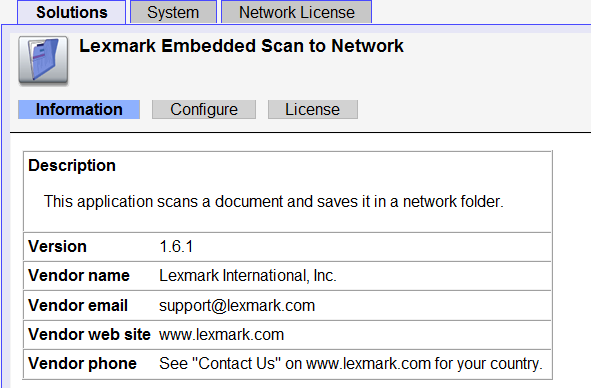
Click on scan to network (note is not licenced, this is the free to use, simplified version) and get
Click on Configure

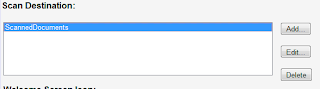
Add a destination (this screen grab is after the event, but you get the idea.


The user id is the netbios name of the user id (no domain name is required)


Step 3 - Scan to Email
On your exchange server create a new SMTP receiver explicitly for the Scan to Email facility


Now back in the printer' web portal, go to the LDAP configuration option
The server below is the full UNC for a domain controller on teh network

 Note that the full DN is of the form CN=,OU=...OU=..., DC=....

Then configure the SMTP Server:
Primary gateway is the full UNC to the server so . eg exchange.lexmark.local

if you follow this all, then Robert's your mother's brother.

Please note some images have been modified to remove client specific information

Wednesday, January 12, 2011

Zen Internet to Amazon Kindle - from triumph to disaster in 2 hours... and why you need to buy a windows PC with your Kindle.


I got home from the client this evening to 2 technical tasks.  Today was the day I left Virgin Media for an ISP that gives a damn.  Zen Internet is now the ISP of choice at Corylus Towers, and the upgrade happened as they said it would - today, and all I needed to do was tweak the router.
I had a new, unused NetGear router (DG834PN) that was going very cheap in the manager specials bin at Staples a few months ago for this very purpose, but on checking the Zen site for the “how to configure your router” discovered a NetGear specific instructions, and wondered if the Virgin specific router firmware in the old DG834 would take a tweak.  I wanted to do this as the Wi-Fi setup (including all the MAC filtering) would remain in place.
Lo and behold, 2 tweaks and the new userid and password and I’m connected.
What’s more my internet connection has moved from 1.6MB to 2.3MB without anything else being done (and I’m pretty sure the 668KB upload is a better connection too).  This bodes well for the other broadband line being migrated later.
So, having restored the Internet connection to the domestic network, the goal was then to get my newly delivered Kindle up and running.  I’d ordered the Wi-Fi only version as I have Wi-Fi in the house and office, and a MiFi unit to cover the situation when hotspots aren’t available.  I prefer it that way to subscribing to more data connections and hotspot services (although of course whilst the Kindle has free 3G, the unit is £41 more expensive).
The Kindle was unboxed, and set to charge for a bit.  After dinner, I grabbed the MAC address of the unit, and added it to both Wi-Fi networks running here and switched on.  The Kindle would not connect to the network, it could see it, and I could see that it was attempting a handshake, but all I got was “Unable to connect to wireless network…”.  Some surfing later gave me cause for concern, so I decided to try some diagnostic tests.
Thirty minutes later, and both network changed from WPA2 to WPA to WEP, from MAC filtering to none, (etc. etc.) nothing was working still.  The device would very nearly connect, but not.
In desperation I got the DFG834PN out,  and just plugged it in.  In factory default it’s completely insecure; but as it wasn’t actually connected to a phone line, it didn’t matter.  A quick check on the iPad confirmed it was working (and got me its IP range – the usual 192.168.0.x), and I tried the Kindle on that.  Again, nothing.
So over to the help line, noting with some wry amusement that the plastic protective sleeves were not yet removed from the Kindle…
At least it was an 0800 number, as the Kindle support line first cut me off, and then on the second call believed I had not bought one!  Eventually we got to work.  The usual interrogation by a customer support line took place, almost down to my inside leg measurement,; then after some initial attempts a full hard reset of the device was prompted.  After this the device briefly connected (albeit at what seemed to be 14bps), and I got a list of books I had already bought – but completely failed to download them beyond a few % (and again very slowly).
Some more diagnostics later Kindle Support decided (as I had over an hour ago!) that the unit was faulty in the Wi-Fi department.  “So I will send you an email with details on how to create a couple of logs files, you then just connect the Kindle to your computer and send us the files”…  At which point I asked why they assumed I had a computer to which I could connect the Kindle.  That caused some fun…  I pointed out that I had an iPad in front of me (which was working perfectly well on the Wi-Fi).  SO I was asked to connect the Kindle to the iPad “but the iPad has no USB!”. 
Several minutes later, Kindle Support had no idea how to overcome this particular problem, but I had shown mercy, and dug out the laptop and grabbed the files.  One of my reasons for reticence is that I would not trust the 3MB contents of these files not to contain data that I consider to be confidential.   I had a quick scan through, and all seemed to be OK, but when they said they’d call back in a couple of days I got properly annoyed.
I suggested that as the unit was not working properly it was “unfit for purpose” and “of unmerchantable quality” under the terms of the Sales of Goods and Services Act 1968 (as amended); and that I thought a more proportionate response (as they already had my money) would be to send a replacement and arrange for collection of the useless unit.
The resulted in a lengthy conversation with his supervisor whilst I listened to more muzak, when he came back, the answer was yes.  The support engineer wanted to know the name of my Wi-Fi network (not keen), but he went back to his colleagues to find out what next – which was go ahead.
So after about 70 minutes on the phone, my Kindle was factory reset (only have a hard reboot though as it stuck again), reboxed, and a replacement due to be with me in 2 days.
After I hung up, my wife commented that I’d remained very calm (surprisingly!) and guessed I might write a word or two about the experience.  Right on both counts!